Cocobi Play One
- 3.3
- Rating
- 1.00M
- Installs
- Free
- Price

 Analysis by App-foxy
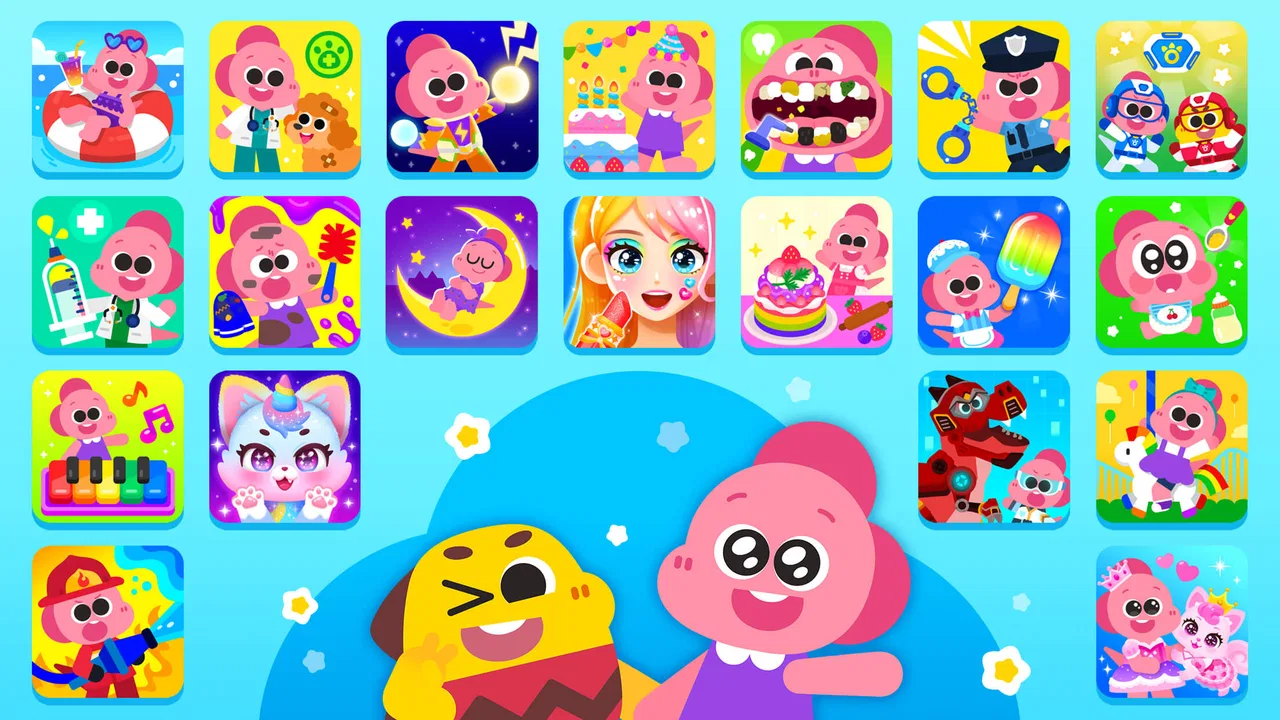
I approached Cocobi Play One as a parent looking for a simple way to keep a child engaged while still offering something more purposeful than an endless stream of videos. It is an educational game from KIGLE that brings several Cocobi experiences together, so the main appeal is variety rather than one narrow lesson. My first impression was that it feels designed for quick starts: a child can enter, choose something familiar or interesting, try an activity, receive an immediate response, and decide whether to continue.
That basic rhythm matters. Young children do not usually want a long explanation before they play, and this game understands that. The experience is built around small actions and quick feedback, which makes it approachable for children who are still learning how to navigate games on a phone or tablet. At the same time, parents should know that the broad collection format can feel less focused than a dedicated spelling, counting, drawing, or puzzle app.
How the play loop works from the first tap
The first action in Cocobi Play One is choosing where to begin. Because the game gathers Cocobi apps in one place, the child is not locked into a single activity type. That can be useful when attention changes quickly: a child who is not interested in one activity can move on to another without leaving the same general environment.
You May Also Like

 Blood Strike: 2.5 Anniversary
Blood Strike’s Loadouts Turn Every Drop Into a Tactical Gamble
A close look at Blood Strike’s custom loadouts: how fast access to signature weapons reshapes its battle royale rhythm, rewards preparation, and narrows the gap between fights.

 Pandora - Music & Podcasts
Pandora’s Music Is Easy to Start, but Harder to Recover
Pandora’s strength is its low-effort path from a seed to a station. Its weak spot is how much confidence it asks you to place in connection, setup, and quiet recovery.

 8 Ball Pool
 Is Built on Rivalries, Rematches, and Routine
A close look at the rivalries, rematches, shared routines, and unanswered safety questions that turn a quick pool match into a persistent mobile community.

 Samsung Music
’s Quiet Strength Is Playing What You Already Own
Its reach comes less from spectacle than from dependable access to a personal library. That simplicity is both the app’s strongest retention engine and its ceiling.

 AccuWeather: Weather Radar
AccuWeather Review: A Quick, Clear Forecast for Everyday Decisions
For everyday plans, the best forecast is the one you can understand quickly. AccuWeather makes rain timing, radar, and local conditions easy to act on, with a few trade-offs.

 Hill Climb Racing
Why Hill Climb Racing Still Turns Crashes Into One More Run
A tiny car, a bumpy hill and one more upgrade: Hill Climb Racing keeps resurfacing because its simple chaos makes every near-miss feel personal.
More From Our News Desk



In practical terms, I would hand this to a child when I wanted a short, self-directed activity rather than a formal lesson. The game is aimed at Everyone, and its educational category gives it a clearer purpose than a purely passive entertainment app. Still, “educational” should not be read as a complete learning program. I see it more as a playful practice space that can support conversation, recognition, coordination, and simple problem-solving alongside adult guidance.
The strongest part of the opening is the low barrier to participation. A child can act first and understand the rules through the response on screen. That is a better fit for early learners than an app that depends on reading instructions. It also makes the game suitable for a shared first session, where an adult can demonstrate one interaction and then let the child take over.
One useful approach is to avoid presenting the whole collection as an unlimited choice. I would begin by suggesting one activity, let the child complete a small section, and then ask what they noticed. This turns browsing into a simple routine: choose, try, talk, and choose again. Without that small amount of structure, the variety may encourage constant switching before the child gets much value from any one activity.
Action becomes understandable through immediate feedback
The feedback rhythm is what keeps the experience accessible. A child does something, sees how the game responds, and learns what to try next. That response may be enough to make the interaction feel rewarding even before the child understands the educational purpose behind it. For younger players, this is important because success is easier to grasp when it is shown immediately instead of explained in a long sentence.
I also like this rhythm for short attention spans. A parent can use the game during a brief wait, a quiet period before dinner, or a transition between activities. The child does not need to commit to a lengthy level or remember a complicated control scheme. The interaction can begin quickly, and the next decision usually feels close at hand.
There is a trade-off, though. Fast feedback can make an activity feel easy without guaranteeing that the child has understood the underlying idea. If a child taps through by trial and error, the game may still provide enough positive response to encourage another attempt. That is not a flaw in a casual children’s game, but it is why I would occasionally ask the child to explain the answer, name an object, count aloud, or show how they knew what to do.
This is one of the more valuable ways to use the app: treat the screen response as the start of a conversation, not the entire lesson. For example, after an activity, I might ask, “What changed when you tapped that?” or “Can you find something similar in the room?” Those questions extend the learning beyond the device without making the session feel like homework.
Why the reward encourages another session
The reward in this kind of game is not only a final result. It is the combination of recognition, completion, and the feeling that another activity is immediately available. When a child receives a clear response after acting, the game gives them a reason to repeat the process. That creates a gentle loop: try something, see the outcome, feel successful, and look for the next small challenge.
The collection format strengthens that loop because the next session does not have to repeat the previous one. A child may return for a different Cocobi activity, or an adult may guide them toward something that better matches the moment. That makes the app more flexible than a single-purpose game, especially in a household where children have different interests.
My advice is to use the reward as a stopping point as often as a reason to continue. If a child completes an activity and is still engaged, another round can be fine. If the child is simply tapping rapidly to reach the next screen, that is a good moment to pause and reset the session. The goal is not to maximize time inside the app; it is to make each short visit feel intentional.
Parents should also pay attention to the commercial side of the experience. The game is free to download, but in-app purchases are listed at up to $37.58 per item. That makes device-level purchase controls and an adult’s quick look at the available options sensible before handing over the phone. A free entry point is useful, but it does not automatically mean every part of the wider experience is cost-free.
Resetting the session without losing the child’s interest
The reset is the moment when the child leaves one activity and decides what comes next. In my view, this is where the app’s biggest strength and weakness meet. Variety prevents the experience from becoming stale, but too much choice can turn the session into aimless menu hopping. A reset works best when it has a small purpose: try a new type of activity, repeat one that was difficult, or stop after a satisfying result.
For a realistic everyday scenario, imagine a child waiting while a parent finishes a short task at home. I would choose one activity together, let the child play independently for a few minutes, and then return for the reset. Instead of asking whether they want to keep playing, I would offer two clear choices: repeat the current activity or try another one. That keeps the child involved while avoiding an overwhelming open-ended menu.
This approach is also helpful when two children share one device. Each child can take a turn with a different activity, while the adult uses the reset between turns to make the handoff clear. It is not a substitute for a dedicated multiplayer game, but the collection format can make shared use less repetitive than passing around one identical puzzle.
I would not rely on the game as a completely unattended solution for long periods. The age rating is Everyone, which makes it broadly approachable, but age suitability and learning suitability are not exactly the same thing. A preschool child may need help understanding an instruction, while an older child may find the activities too simple. The best experience depends on matching the activity to the child rather than assuming the whole collection will fit every age equally well.
Who will enjoy the collection, and who should choose something else
Cocobi Play One is a good match for families already familiar with the Cocobi style, children who enjoy switching between short activities, and parents who want an educational game with a playful entry point. It is also practical for occasional use because the child does not need to build a complicated profile or learn a deep system before getting started.
I would be more cautious about recommending it to a family seeking measurable, structured progress in one subject. If the main goal is systematic phonics practice, a carefully sequenced mathematics program, or detailed creative tools, a specialized app will usually be a better choice. A collection can offer breadth, but it cannot necessarily provide the same depth or progression as an app built around one learning target.
It may also be a poor fit for children who become frustrated by frequent choices or who need a clear challenge curve. In that case, a single focused puzzle game could create a stronger sense of improvement. Conversely, a child who loses interest quickly may benefit from the range here, provided an adult helps them settle on an activity instead of jumping constantly between options.
The developer is KIGLE, and the current version is 1.0.9. The game requires Android 7.0 or later, so it should suit many older Android devices, although the actual experience will still depend on the device’s screen, responsiveness, and available storage. It has passed the million-install mark and holds an average rating of 3.5 from around 1.2 thousand ratings. I read that as a sign of broad visibility with mixed experiences rather than an automatic recommendation; the rating is a useful reminder that children and families may respond differently to the collection format.
Small habits that make the app more useful
My first practical tip is to create a “one activity before switching” rule. It does not need to be strict or competitive. Simply finishing one small task before browsing elsewhere helps the child experience the action-feedback-reward cycle instead of treating the app as a menu of thumbnails.
My second tip is to use the game as a prompt for offline practice. If an activity involves recognition, sorting, movement, or simple choices, follow it with something physical: sort household objects, identify colors in the room, or describe what happened. This makes the educational value less dependent on screen time and helps reveal whether the child understood the idea or only followed visual cues.
A third useful habit is to reserve different activities for different moments. A calmer option may suit bedtime wind-down better than an energetic interaction, while a short waiting period may be ideal for something that can be completed quickly. Because the app gathers multiple Cocobi experiences, planning by situation is more effective than opening it without a goal.
Finally, I would check purchase protections before the child explores freely. The free price makes trying the game easy, but the listed in-app purchase ceiling means adults should treat the device settings as part of the setup. This is a small preparation step that prevents the commercial side from becoming an unpleasant surprise during an otherwise relaxed play session.
My verdict on the repeatable loop
The core loop works because it is easy to understand: the child takes an action, receives a quick response, gains a small sense of achievement, and then has a reason to begin again. The reset is flexible enough to support different moods and attention spans, but it benefits from adult guidance so variety does not become distraction.
I would recommend Cocobi Play One to parents who want a broad, approachable collection of educational mini-experiences and who are comfortable adding a little structure around play. I would not choose it as the only learning tool for a child who needs a carefully measured curriculum, nor would I ignore the purchase settings simply because the game itself is free.
Overall, I see it as a useful casual option rather than a complete teaching system. Its best sessions are short, purposeful, and occasionally shared with an adult. When used that way, the mix of action, feedback, reward, and reset gives children a friendly reason to return without demanding that every visit become a formal lesson.
FAQs for Cocobi Play One
01What is Cocobi Play One and who is it suitable for?
Cocobi Play One is an interactive app designed for children, offering a range of educational games and activities. It's aimed at kids aged 3 to 8, providing a safe and engaging environment to learn and play. Parents will appreciate the app's focus on educational content, making it a great choice for early childhood development.
02Is Cocobi Play One available on both Android and iOS devices?
Yes, Cocobi Play One is available for download on both Android and iOS platforms. This ensures a wide reach, allowing users with different devices to access the app. You can easily find it on the Google Play Store and Apple App Store by searching for Cocobi Play One.
03Does Cocobi Play One require an internet connection to play?
Cocobi Play One offers offline accessibility for most of its games and activities. While some features may require an internet connection for updates or additional content, the core gameplay can be enjoyed without being online, making it convenient for use on the go or in areas with limited connectivity.
04Are there in-app purchases or ads in Cocobi Play One?
Cocobi Play One is designed to be child-friendly, with minimal in-app purchases and no intrusive ads. Some additional content or features may be available for purchase, but the app ensures a safe environment by keeping these options discreet and easy for parents to manage.
05How safe is Cocobi Play One for children?
Cocobi Play One prioritizes safety with a child-friendly interface and strict privacy policies. Personal information is never collected from children, and parental controls are available to monitor app usage. The app is committed to providing a secure and enjoyable experience for young users.
Pros
- User-friendly interface makes navigation easy.
- Wide variety of mini-games included.
- Engaging graphics and sound effects.
- Regular updates with new content.
- Supports offline play mode.
Cons
- In-app purchases can be expensive.
- Requires significant storage space.
- Some games may be too simple for older users.
- Occasional ads can interrupt gameplay.
- Limited parental controls available.

Cocobi Play One
Gallery